Tag Archives: javascript

Auto-claim Zynga Rewards (Everybody & Friends)

Here’s a little bookmarklet I wrote that you can add use automatically collect Zynga rewards while you’re playing games over at Zynga.com. It seems to work for all rewards regardless of which game you’re playing (though I primarily use it for CastleVille).

javascript:var classesPublic='zui_list_itemsContainer zui_zdc_gameboard_rts_rtsList_itemsContainer zui_zdc_gameboard_rts_rtsPublicList_itemsContainer';var classesNeighbors='zui_list_itemsContainer zui_zdc_gameboard_rts_rtsList_itemsContainer zui_zdc_gameboard_rts_rtsNeighborList_itemsContainer';var classesButtons='zui zui_button zui_enabled zui_button_enabled zui_zdc zui_button_zdc zui_zdc_enabled zui_button_zdc_enabled zui_button_tiny zui_button_white';var unclaimedRewardsNeighbors,unclaimedRewardsPublic;var unclaimedNeighborsInit=unclaimedPublicInit=true;function collectRewardsNeighbors(){for(unclaimedIndex=0;unclaimedIndex=1){if(unclaimedNeighborsInit){unclaimedNeighborsInit=false;collectRewardsNeighbors();}else{setTimeout('collectRewardsNeighbors()',1000);}}},false);var parentUnclaimedPublic=document.getElementsByClassName(classesPublic)[0];parentUnclaimedPublic.addEventListener('DOMSubtreeModified',function(){unclaimedRewardsPublic=parentUnclaimedPublic.getElementsByClassName(classesButtons);if(unclaimedRewardsPublic.length>=1){if(unclaimedPublicInit){unclaimedPublicInit=false;collectRewardsPublic();}else{setTimeout('collectRewardsPublic()',1000);}}},false);

What you need to do, is copy the code above and paste it into a new bookmark within your browser. Couldn’t be easier :)

Note: This script requires a browser that supports the DOMSubtreeModified – DOM Level 2 Mutation Event (eg: IE9, FF, Safari and Chrome)
Bookmark and Share

jQuery UI replacement for javascript:confirm() links

Here is a nice confirmation handler to replace javascript:confim() links using jQuery UI…

$(function() {
    $('.ui-icon-trash').click(function(event){
        event.preventDefault();
        var targetUrl = $(this).attr('href');
        $('<div title="Confirmation Required"><p>Delete this record?</p></div>').dialog({
            autoOpen: true,
            modal: true,
            resizable: false,
            buttons: {
                Yes: function() {
                    window.location.href = targetUrl;
                },
                No: function() {
                    $(this).remove();
                }
            }
        });
    });
});

I use it for “delete” links (should be obvious) but it can be easily adjusted for any other type of confirmation.

Cheers!

Bookmark and Share

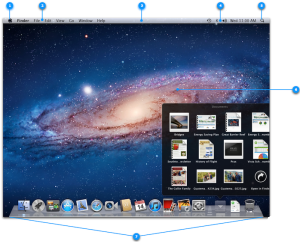
Horizontal icon (footer) layout for Facebook chat contacts window… kind of like the Mac OSX app bar

If you came here looking for the code, that will be a bit further down the road. Here is the plan…

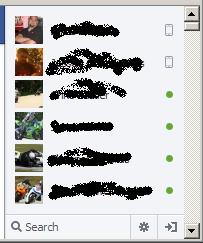
Take this…

Note: The above screen has my hide offline users mod applied ;)

And make it look more like this…

This is a “for fun” project and will be completed as time permits. So check back soon for progress updates.


Bookmark and Share

Calculate the total height of child elements of a clipped (overflow: hidden) parent tag

Ever have an element with clipped content and wanted to know the total height of the elements contained therein? I have a client who wants the height of the main content to be clipped to a preset height (don’t ask me why). Which means I need to dynamically add a “read more” link to expand the container and show all the content.

Well, here’s how you calculate the combined height of the children with jQuery… Continue reading

Bookmark and Share

Bookmarklet: Submit a login form using javascript within a bookmark

If you’re like me, you have many bookmarks to administration areas that require authentication. For you, this script is a priceless time-saver.

Let’s say your login page has a form similar to the following…

<form action="/login.php" method="post">
    <label>Username: <input type="text" name="user"></label>
    <label>Password: <input type="password" name="pass"></label>
    <input type="submit" value="Log In">
</form>

Some logins simply cannot be stored in the browser’s password system. So, to save you the extra effort of manually logging in on each visit to such pages, create a bookmark that automatically logs you into the system.

Here’s the code to submit that form using a bookmarklet… Continue reading

Bookmark and Share